


Color Laser Printer vs Inkjet: Choosing the Right Technology for Your Business

AI Overview:
Choosing between a color laser printer and an inkjet printer depends on how your business prints. Laser printers excel at fast, high-volume, text-heavy workloads with crisp, smudge-proof output and lower long-term cost per page, making them ideal for offices like accounting, legal, and administration. Inkjet printers shine in color accuracy, photo quality, and media flexibility, making them better suited for marketing, design, and creative teams.
The guide breaks down key differences in technology, print quality, speed, durability, total cost of ownership, security, and environmental impact—helping businesses match the right printer to their workflow, budget, and productivity goals.
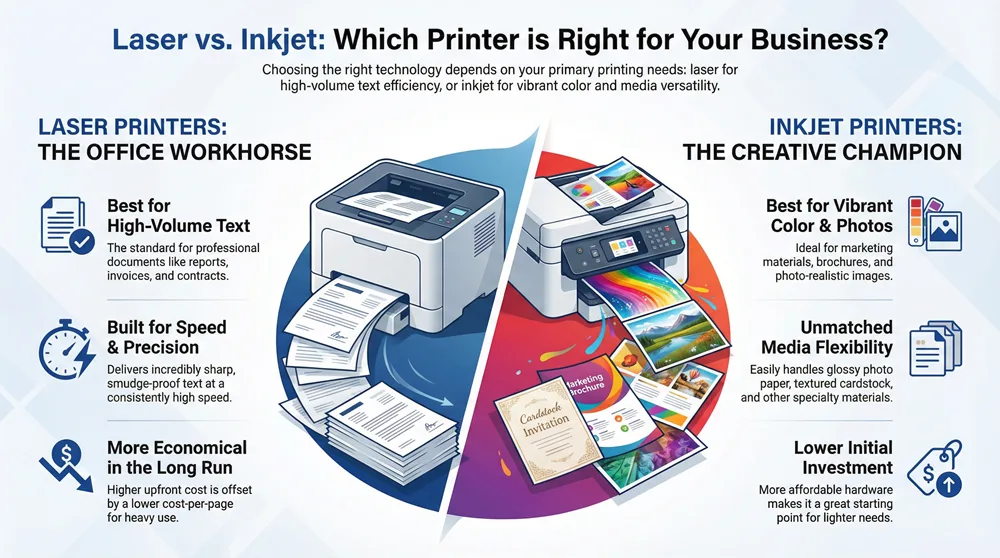
Selecting the right printer for your business is a critical decision that impacts workflow, budget, and the quality of documents you present to clients. The debate between a color laser printer vs. inkjet comes down to matching the right technology to your specific needs. Laser printers, which use toner powder, deliver exceptional speed and crisp text, making them ideal for high-volume office tasks. Inkjet printers, using liquid ink, excel at blending colors for photo-quality images, perfect for marketing and creative projects.
This guide provides a clear, expert comparison to help you determine whether your priority is text clarity and volume or vibrant color and media flexibility, ensuring you make a cost-effective and productive choice.
Foundational Differences in Printing Technology
Choosing a printer is a key infrastructure decision with a direct impact on your budget, team efficiency, and document quality. The color laser vs. inkjet debate isn’t about finding a single “best” printer but about aligning the right technology with your specific business operations. To move beyond marketing claims, it’s essential to understand how each technology works.
A laser printer operates with precision. It uses a laser to draw an image onto a charged drum, which attracts toner powder. This powder is then transferred to paper and fused using heat. The entire process is exceptionally fast, resulting in crisp, smudge-proof text and graphics built for professional use.
Inkjet printers take a different approach. They spray thousands of microscopic droplets of liquid ink directly onto the page. This method enables the subtle color blending and deep tones required for photo-realistic images and rich graphics that laser technology often struggles to replicate. For multifunction devices, other features—like knowing how to send a fax from a printer—can also be a deciding factor.
To provide a clear starting point, here is a side-by-side look at their core strengths and weaknesses.
Laser vs Inkjet a Quick Comparison
| Factor | Color Laser Printer | Inkjet Printer |
|---|---|---|
| Best For | High-volume text, reports, and professional documents. | High-quality photos, marketing materials, and graphics. |
| Initial Cost | Generally higher upfront hardware investment. | Lower initial hardware cost, especially for consumer models. |
| Print Speed | Significantly faster, especially for multi-page documents. | Slower, particularly for high-resolution color prints. |
| Supplies | Toner cartridges; higher yield and less frequent replacement. | Ink cartridges; lower yield, more frequent replacement. |
| Maintenance | Less prone to issues from infrequent use. | Prone to clogged print heads if not used regularly. |
Understanding these fundamental differences is the first step. For a deeper analysis of specific models that could fit your office, our guide on the best small business printer copier offers tailored recommendations.
Comparing Print Quality and Media Handling
Print quality is often the most visible difference when comparing color laser vs. inkjet printers, but the story is more nuanced than simple resolution numbers. The underlying technology in each machine dictates its area of excellence. Ultimately, the “better” output depends entirely on whether your business requires razor-sharp text or rich, vibrant images.
Laser printers are engineered for precision. They fuse a dry powder called toner onto paper with heat, creating incredibly sharp text and clean, well-defined lines. This makes them the standard for professional documents where clarity is paramount.
If you are printing contracts, financial reports, or detailed schematics, a laser printer’s output is the undisputed industry benchmark. Text remains crisp even at small font sizes, and lines are perfectly straight with zero bleed-through, conveying a high level of professionalism.
Laser Printers: The Standard for Text Clarity
A laser printer’s primary advantage is its consistency and precision. Because the toner powder sits on the surface of the paper instead of soaking into it, text edges remain perfectly defined. This eliminates the slight feathering or “bleeding” that can occur with liquid ink on standard office paper.
This technical superiority is why businesses in the legal, financial, and engineering sectors almost universally rely on laser technology. When a document’s authority depends on its clarity, nothing surpasses the clean output of a laser printer. You can get a deeper look into the specifics of color printing technology for copiers to see how this translates to larger, multifunction devices.
The heat-fusion process also makes laser prints durable and smudge-proof the moment they land in the output tray. With no drying time required, documents can be handled immediately, a significant benefit in a fast-paced office.
Key Insight: Laser printers are unbeatable for documents where text and line precision is non-negotiable. The toner-based process guarantees sharp, smudge-proof output that’s instantly ready for professional use, making it the clear winner for high-volume, text-heavy printing.
Inkjet Printers: Champions of Color and Media Flexibility
Where laser printers excel in precision, inkjet printers lead in depth and vibrancy. By spraying microscopic droplets of liquid ink, inkjets master the art of blending colors, creating the smooth gradients and subtle tonal ranges necessary for photo-realistic images.
This makes them the preferred choice for marketing agencies, design studios, and any business creating customer-facing materials. For projects like brochures, high-impact presentations, or product mockups, an inkjet’s ability to produce deep blacks and a wider color gamut is a significant advantage. The liquid ink blends seamlessly, creating images that are rich and immersive.
This core difference also dictates how they handle different types of media. Inkjet technology is far more versatile.
- Glossy Photo Paper: Inkjets are specifically designed to work with specialized photo papers, producing prints that rival those from a professional lab.
- Textured Cardstock: The non-contact printing process allows inkjets to handle thicker and more textured media without jamming.
- Specialty Materials: This includes everything from canvas and vinyl transfers to unique art papers.
In contrast, laser printers are more limited. The high heat from the fuser unit makes them incompatible with heat-sensitive materials and optimizes them primarily for standard office paper. While they perform perfectly on that medium, this lack of flexibility is a major consideration for creative teams. If your business needs to produce a wide variety of marketing materials in-house, an inkjet offers versatility a laser cannot match.
Evaluating Speed and High Volume Capabilities
When your business’s productivity is on the line, printer performance becomes a core operational factor. How fast a machine prints and how well it handles a heavy workload directly impact your team’s efficiency. In the color laser printer vs inkjet debate, this is one area that often has a clear winner, depending on your office’s specific demands.
The key metrics to focus on extend beyond marketing claims. We need to look at practical measures: print speed, measured in pages per minute (PPM), and the machine’s endurance, defined by its monthly duty cycle and, more importantly, its recommended monthly print volume.
Understanding Print Speed in a Business Context
Print speed, or PPM, is a headline specification for any printer, but it only tells part of the story. Laser printers have a built-in advantage, especially for multi-page documents. Because they image the entire page at once, they can produce pages at a relentlessly consistent pace after the first one is printed.
For example, a mid-range laser printer might be rated at 33 PPM for both color and monochrome. This means a 100-page report is completed in about three minutes. An inkjet, which builds the page line by line, can slow down dramatically when printing complex, high-coverage color graphics.
Real-World Example: A law firm generating hundreds of pages of discovery documents requires the steady, uninterrupted output of a laser printer to maintain workflow. In contrast, a marketing team printing a few high-quality design mockups will likely find an inkjet’s speed perfectly adequate for its needs.
Key Differentiator: Don’t forget the First Page Out Time (FPOT). This tells you how quickly a printer delivers the first page from sleep mode. Lasers often have a slightly longer FPOT because the fuser unit needs to warm up, while inkjets can sometimes produce a single page faster.
Defining Durability: Monthly Duty Cycle vs. Recommended Volume
Beyond raw speed, you need a machine that can withstand the daily demands of a busy office. This is where duty cycle and recommended print volume are critical, and it is vital to understand they are not the same.
- Monthly Duty Cycle: This is the absolute maximum number of pages a printer can produce in a month without mechanical failure. Think of it as the redline on a car’s engine—you can hit it, but it’s not sustainable.
- Recommended Monthly Print Volume: This is the manufacturer’s suggested range for consistent, reliable performance. Operating within this volume ensures the device functions without premature wear and tear.
Laser printers are engineered for high-demand environments. An office-grade color laser can have a duty cycle of 50,000 pages or more, with a recommended volume in the thousands. This makes them the definitive choice for centralized workgroups in departments like accounting, HR, or logistics that manage a constant flow of documents.
This high-volume capability is a primary reason laser technology dominates the corporate sector. The global laser printer market was valued at approximately $9.62 billion in 2023 and is projected to continue growing, largely due to the reliability of these workhorses. You can learn more about these market projections for printers on Fortunebusinessinsights.com.
While business-grade inkjets have become much more durable, they generally target smaller teams with more moderate needs. Their recommended volumes are typically lower, making them a better fit for departments with lighter printing demands or where pristine color quality is a higher priority than sheer output.
Calculating the Total Cost of Ownership
When deciding between a color laser printer vs inkjet, the initial purchase price is just the beginning. A smart business evaluates the Total Cost of Ownership (TCO), which reveals the true long-term financial impact of a printer on your budget.
TCO is a combination of the initial hardware price, the ongoing cost of consumables (toner or ink), and potential maintenance expenses. Understanding how these factors interact is key to preventing a seemingly good deal from becoming a costly liability.
Breaking Down the Cost Per Page
The most significant component of TCO is the cost per page (CPP). This metric—how much you spend on supplies for each page printed—is where the economic difference between laser and inkjet printers becomes most apparent.
Laser printers typically have a higher upfront cost but are built for high-volume printing. They use high-yield toner cartridges capable of producing thousands of pages before needing replacement. Conversely, business inkjets often have a lower initial price but have historically used smaller ink cartridges requiring more frequent replacement. While modern high-yield and ink-tank models have narrowed the gap, their CPP for color-heavy documents can still exceed that of a laser, depending on usage patterns.
To get a better handle on these ongoing expenses, check out our guide on how to save on office printers with 13 smart tips.
Key Takeaway: The less you print, the more the initial hardware price matters. But as your print volume climbs, the cost per page takes over as the dominant factor in your total spending. This is where laser printers often pull ahead as the more economical choice in the long run.
How Print Volume Shapes Your TCO
The right financial choice is directly tied to your team’s printing habits. Whether you print a few hundred pages a month or several thousand determines which technology is more cost-effective.
Market data supports this. While inkjets have been popular, businesses are becoming more sophisticated in analyzing long-term costs. As a result, projections show inkjet page volumes declining faster than laser, partly because laser printing is recognized as the more economical option for high-volume office needs.
Let’s illustrate with a practical example. The table below models the estimated three-year TCO for two comparable mid-range office printers—one laser, one inkjet—at different monthly print volumes.
TCO Scenarios by Monthly Print Volume
The results are clear: at very low volumes, the business inkjet’s lower initial cost makes it the winner. However, as the monthly page count increases, the laser printer’s lower monochrome CPP erases that initial advantage and begins to deliver significant long-term savings.
Identifying this “tipping point” for your business is crucial. The only way to know for sure is to model your own expected usage. This simple exercise will reveal which technology truly aligns with your financial and operational goals.
The Hidden Costs: Security, Maintenance, and Environmental Impact
Beyond purchase price and cost-per-page, the practical realities of owning a printer include maintenance, security, and environmental footprint. These factors can significantly influence your overall experience and operational costs. A printer that requires constant attention or creates security vulnerabilities is no bargain, regardless of its initial price.
Let’s start with maintenance. The internal mechanics of laser and inkjet printers are fundamentally different. Laser printers are built as workhorses, with long-lasting components like imaging drums and fuser units designed for high-volume output. This translates to less user intervention and more uptime for your office.
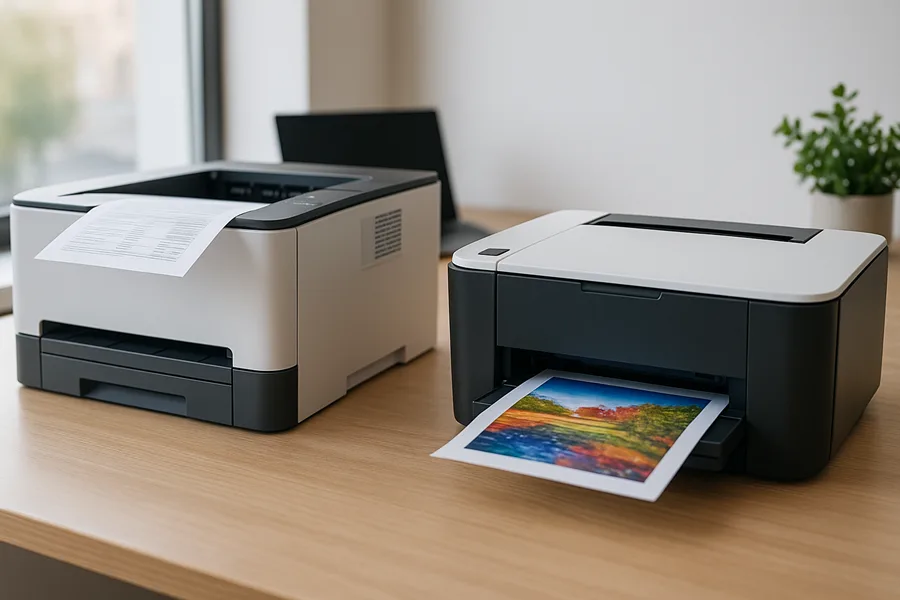
Inkjets, by contrast, can be more temperamental, particularly with infrequent use. If an inkjet sits idle, the liquid ink in its printhead nozzles can dry and cause clogs, triggering frustrating and wasteful cleaning cycles. For an office where printing is sporadic but essential, a laser’s reliability is a clear advantage.
Enterprise Security for a Connected Office
Any device on your network is a potential entry point for cyber threats, and your printer is no exception. Business-grade printers store sensitive data in memory and print queues. Enterprise-class laser printers typically offer a more robust suite of security features.
These are not just basic password settings but advanced data protection measures:
- Secure Print Release: This feature holds print jobs until the user authenticates at the device with a PIN or security badge, preventing sensitive documents from being left unattended.
- Encrypted Data Transmission: Protects data as it travels over the network to the printer, making it unreadable to unauthorized parties.
- Firmware Integrity Checks: The printer automatically verifies its operating software to ensure it has not been compromised by malware.
While high-end business inkjets are improving their security capabilities, enterprise laser multifunction printers are often designed with a security-first approach. This makes them the standard for industries like healthcare, finance, and legal, where data protection is a regulatory requirement.
A Balanced Look at Environmental Impact
Sustainability is a growing priority for modern businesses. When comparing the environmental footprint of laser versus inkjet printers, the “greener” choice depends on whether you prioritize energy consumption or physical waste.
Inkjet printers generally consume less energy. They do not require a fuser to be heated, so they draw significantly less power during operation. For companies focused on reducing their electricity usage and carbon footprint, this is a major benefit.
Industry Insight: The lower energy draw and smaller cartridge size of inkjet technology have helped it dominate the market. As of 2020, the global inkjet printer market was valued at over $41.2 billion, easily outpacing the laser toner market. Sales figures show a strong preference for inkjets in home and small business settings. You can dive deeper into these printer market share trends at TonerBuzz.com.
On the other hand, laser printers offer a compelling case for waste reduction. A single high-yield toner cartridge can produce the same number of pages as dozens of smaller ink cartridges, meaning less plastic and packaging ends up in landfills. Additionally, major manufacturers have well-established recycling programs for used toner cartridges.
Ultimately, your decision should align with your company’s specific sustainability goals: minimizing energy usage or reducing physical consumable waste.
Actionable Recommendations for Your Business
The color laser printer vs inkjet decision boils down to matching the right technology to your daily business operations. There is no single “best” printer—only the right printer for your specific workflow, budget, and priorities. Let’s translate this analysis into practical advice.
Case Study 1: The Marketing Agency. A marketing agency’s business is built on visual impact. It requires flawless color fidelity for client proofs and campaign mockups. For this use case, a high-end business inkjet is the clear choice. Its superior color blending and ability to handle glossy paper and cardstock directly support the agency’s mission to produce stunning creative materials.
Case Study 2: The Accounting Firm. A busy accounting firm generates multi-page reports, invoices, and contracts continuously. A color laser printer is a far smarter investment. Its speed, lower cost-per-page for monochrome text, and robust construction are perfectly suited for a high-volume, text-dominant environment.
This decision tree provides a quick visual guide for selecting a printer based on your business priorities.
As the graphic illustrates, laser printers excel where security is a top concern or in low-use environments where ink drying is a risk. Conversely, inkjets are often the more energy-efficient choice.
Adopting a Hybrid Strategy
For many businesses, the most effective solution is not an either/or choice but a hybrid approach. Deploying both technologies allows you to place the right tool in the right hands, maximizing efficiency and controlling costs across the organization.
- Sales and Marketing: Equip these teams with business inkjets to produce vibrant, client-ready collateral on demand.
- Finance and Administration: Deploy monochrome or color laser printers for fast and economical internal records and reports.
- Executive Offices: A compact color laser provides reliable and secure printing for sensitive documents.
This strategy ensures no department is hindered by a mismatched printer. Each team gets a device built for its specific tasks, which boosts productivity and provides better control over operational costs.
Optimizing Your Entire Print Infrastructure
Choosing the right hardware is the first step. To truly optimize your printing overhead, consider a solution like Managed Print Services. This service outsources the management of your entire printer fleet—including supplies, maintenance, and security monitoring—to a team of experts.
This approach frees you to focus on your core business, confident that your print environment is secure, cost-effective, and always operational. It transforms a recurring, unpredictable capital expense into a stable, managed operational cost. An expert assessment can often uncover significant savings and efficiency gains you might otherwise miss.
Answering Your Top Questions
When weighing the color laser printer vs inkjet decision, several practical questions often arise. Here are answers to the most common inquiries from businesses seeking the right fit.
Are Laser Printers Always Cheaper Per Page?
Not always. The answer depends on what and how much you print. For high volumes of black-and-white documents, a laser printer is almost always more economical. Its high-yield toner cartridges produce thousands of pages, driving the cost-per-page (CPP) down significantly.
The calculation changes with color printing. For offices with low-to-moderate color needs, a modern business inkjet can be surprisingly competitive and may even offer a lower color CPP. A thorough analysis of your print volume and color-to-monochrome ratio is necessary to determine the most cost-effective option.
Can Inkjet Printers Produce Durable, Waterproof Documents?
Yes, they can. This represents a significant advancement in inkjet technology. While laser prints are inherently water-resistant because toner is fused onto the paper, many of today's business inkjets now use pigment-based inks.
Pigment-based inks use solid particles that sit on top of the paper rather than soaking in like traditional dye-based inks. The result is a print that is highly resistant to water, smudging, and fading, making it perfectly suitable for business documents that must withstand handling and last for years.
How Does Infrequent Use Affect Each Printer Type?
This is a critical differentiator between the two technologies. Infrequent use is the primary weakness of inkjet printers. If an inkjet sits idle for extended periods, the liquid ink in the printhead nozzles can dry and cause clogs. Resolving this issue often requires running cleaning cycles, which waste both time and a significant amount of ink.
Laser printers do not have this vulnerability. Since they use a dry toner powder, they can remain idle for weeks or months and function perfectly when needed. For any role where a printer is used sporadically, a laser is the more reliable and lower-maintenance choice. It simply works.
At 1-800 Office Solutions, we understand that the right printer is a vital tool for your business’s productivity. Our experts are ready to analyze your specific needs and help you find the perfect balance of performance, cost, and reliability.
Ready for a personalized recommendation that aligns with your operational goals? Get a free quote today and let us build a print solution that truly works for your business.