



How to Create a Disaster Recovery Plan: A Practical Guide

AI Overview:
This guide delivers a clear, step-by-step framework for building a disaster recovery (DR) plan that protects critical systems, minimizes downtime, and ensures business resilience. It explains why DR planning is essential, how to assess risks and business impact, define realistic recovery objectives (RTO/RPO), choose the right recovery strategies, and organize response teams and communications. The article also emphasizes regular testing, continuous updates, and a shift from reactive recovery to proactive resilience—helping organizations of any size prepare for disruptions and recover with confidence.
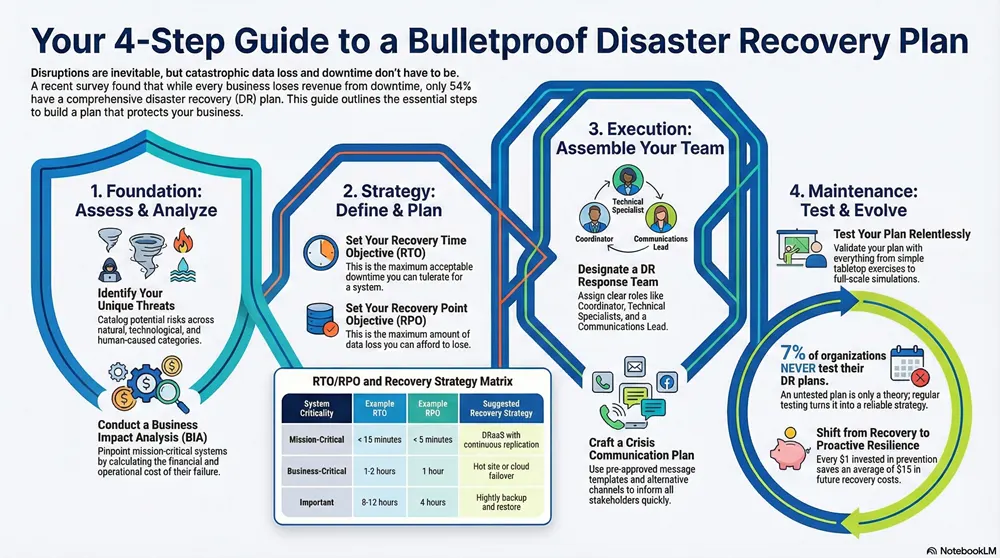
A major disruption can strike at any time, threatening your operations, finances, and reputation. Without a clear plan, your organization is left vulnerable to catastrophic data loss and costly downtime. This guide provides a proven, step-by-step framework for creating a disaster recovery plan that protects your critical assets and ensures business resilience. By following these practical steps, you can turn the chaos of a disaster into a manageable, predictable response.
Why a Disaster Recovery Plan is Non-Negotiable
Business disruptions don’t wait for a convenient time. Whether it’s a ransomware attack that locks up your data, a critical server failure, or a natural disaster that shuts down your office, a single event can trigger severe financial and operational damage. Without a plan, your response will be reactive, leading to confusion, panicked decisions, and a much larger impact on your bottom line.
A well-crafted disaster recovery (DR) plan is more than a document; it’s a dynamic guide that equips your team with step-by-step instructions to protect the company. It builds confidence among your employees, customers, and partners by demonstrating your commitment to operational stability.

An effective plan helps you:
- Minimize Financial Losses: Clear recovery steps drastically shorten the length—and cost—of an outage.
- Maintain Business Continuity: By prioritizing essential tasks and data for restoration, you can keep core operations running.
- Enhance Data Protection: Regular, verified backups become a core part of your operations, ensuring data is safe and accessible when needed most.
Despite the high stakes, many businesses are unprepared. A recent global survey revealed that only 54% of organizations have a comprehensive DR plan in place. This is a massive preparedness gap, especially since every organization surveyed admitted to losing revenue because of downtime. You can explore more of these eye-opening disaster recovery statistics to understand the full picture.
This infographic highlights the discrepancy between perceived preparedness and the frequency of actual outages.
The data is clear: while just over half of businesses have a plan, disruptive outages are a universal problem. This isn’t an “if” scenario; it’s a “when,” and robust preparation is the only way to ensure resilience.
Starting with a Risk Assessment and Business Impact Analysis
Before you can build a practical disaster recovery plan, you must understand what you are protecting and the threats you face. This foundational stage involves a critical look at your organization to identify vulnerabilities and determine which assets are essential for survival.
This process is driven by two key analyses: a comprehensive Risk Assessment and a detailed Business Impact Analysis (BIA).
The risk assessment identifies potential threats—from a regional hurricane to a targeted ransomware attack. The BIA determines which parts of your business would be most affected by those threats, telling you which systems you absolutely cannot afford to lose.
Identifying Your Unique Risks
Every business faces a unique set of threats based on its location, industry, and technology stack. The goal here is to get specific. A manufacturing plant in a coastal region must prioritize hurricane preparedness, while a financial services firm may focus more on cybersecurity threats and data breaches.
To gain a clear picture of your vulnerabilities, catalog potential disasters across key areas:
- Natural Disasters: Consider events common to your region, such as hurricanes, floods, wildfires, tornadoes, or earthquakes.
- Technological Failures: This broad category includes everything from critical server failures and power outages to internet service disruptions.
- Human-Caused Events: These can be accidental, like an employee mistakenly deleting a production database, or malicious, such as a phishing attack that unleashes ransomware.
The impact of natural disasters alone is staggering. Weather-related catastrophes are responsible for more than 90% of disaster-related losses in the U.S., which recently topped $320 billion in a single year. These figures underscore the importance of proactive planning.
A great way to structure this analysis is to conduct a thorough SWOT analysis. The “Threats” quadrant of the SWOT framework provides a business-focused method for identifying and organizing these external risks.
Conducting a Business Impact Analysis
Once potential threats are listed, the BIA helps you understand their consequences. This is where you connect specific IT systems to the business functions they support and calculate the cost of their failure. The primary goal is to identify which systems are mission-critical.
For example, a logistics company would classify its shipping and inventory management software as a Tier 1 asset. If that system goes down, orders stop, trucks don’t move, and the business grinds to a halt. In contrast, an internal HR portal might be a Tier 3 asset—important, but its temporary loss won’t stop core business operations.
A BIA is not just a technical exercise; it’s about creating a clear hierarchy of what to save first. By quantifying the financial, operational, and reputational damage of an outage for each system, you justify DR spending and ensure your recovery team focuses on what truly matters when every second counts.
To define this hierarchy, calculate potential losses over time for each critical system:
- How much revenue is lost per hour? Use average sales data to quantify the impact of an e-commerce site outage.
- What is the impact on your reputation? While harder to quantify, an outage can severely damage customer trust and brand image.
- What are the additional operational costs? Consider wages for idle employees or the cost of manual workarounds.
- Will you face fines or penalties? Downtime may breach service-level agreements (SLAs) or industry regulations, leading to significant fines.
This data-driven approach removes guesswork from your DR planning. You can get a much deeper look into this process in our cybersecurity risk assessment management guide. Completing a thorough risk assessment and BIA provides a solid blueprint for the rest of your disaster recovery plan, ensuring every decision is backed by sound business logic.
Defining Realistic Recovery Objectives and Strategies
After your Business Impact Analysis has identified your critical assets, the next step is to define what a “successful recovery” looks like. This means setting hard, measurable targets that will shape every decision in your disaster recovery plan.

This comes down to two of the most important metrics in business continuity: RTO and RPO. Defining these correctly is key to building a plan that is both effective and cost-efficient.
Demystifying RTO and RPO
Think of RTO and RPO as the guardrails for your recovery efforts. They prevent you from overspending on protections for non-critical systems while ensuring you invest adequately in the ones that keep your business running.
- Recovery Time Objective (RTO): This is the maximum acceptable downtime for a specific system following a disaster. It answers the question, “How long can we survive without this system before significant damage occurs?”
- Recovery Point Objective (RPO): This metric defines the maximum amount of data loss your business can tolerate, measured in time. It answers, “How much data from our last good backup can we afford to lose or re-enter manually?”
These two numbers directly dictate the cost and complexity of your DR solution. A near-zero RTO and RPO require sophisticated technologies like real-time data replication and automatic failover. Conversely, longer RTOs and RPOs allow for more affordable options, such as daily cloud backups.
RTO and RPO are business decisions, not just technical specifications. They must be directly tied to the financial and operational impacts identified in your Business Impact Analysis. An e-commerce payment system might require an RTO of five minutes and an RPO of seconds, while an internal HR portal could have an RTO of 24 hours and an RPO of 12 hours.
This table illustrates how RTO and RPO might look for different systems in a typical business.
| Business System | System Criticality | Example RTO | Example RPO | Suggested Recovery Strategy |
|---|---|---|---|---|
| E-commerce Website | Mission-Critical | < 15 minutes | < 5 minutes | DRaaS with continuous replication |
| Customer Relationship Management (CRM) | Business-Critical | 1-2 hours | 1 hour | Hot site or cloud failover |
| Internal File Server | Important | 8-12 hours | 4 hours | Nightly backup and restore to a cold site |
| Development/Test Server | Non-Essential | 24-48 hours | 24 hours | Weekly backups with manual restore |
This tiered approach is the smartest way to allocate your DR budget, ensuring not all systems are treated equally.
Choosing the Right Recovery Strategy
With your RTOs and RPOs defined, you can match them to the right recovery strategies. This is where you pair technical solutions with your business needs and budget. A comprehensive plan often uses a mix of methods.
Here are a few common strategies, from basic to advanced:
- Backup and Restore: This is the foundation of any DR plan. Data is backed up regularly to a separate location (cloud, offsite tapes) and is restored after an incident. It’s cost-effective but typically results in longer RTOs.
- Cold Site: This is an empty office or data center space you can move into after a disaster. You must bring in and set up all equipment, making for a slow, manual recovery. It’s inexpensive, but downtime can be extensive.
- Hot Site: A hot site is a fully functional, mirror image of your primary data center, with servers, networking, and software ready to go. Data is often replicated in near real-time, allowing for a rapid failover and a very short RTO. It’s highly effective but is the most expensive option.
- Disaster Recovery as a Service (DRaaS): This cloud-based solution has become a game-changer. A third-party provider replicates your data and servers to their cloud. When a disaster occurs, you “failover” to their environment. DRaaS offers a great balance between fast recovery times and predictable, subscription-based costs.
Your organization will likely implement a blended strategy. To learn more about the specifics, explore how to create a backup and recovery strategy plan.
The goal is to create a tiered recovery model where mission-critical applications receive premier protection with DRaaS or a hot site, while less critical systems are covered by daily cloud backups. This ensures you protect what matters most without wasting resources.
Assembling Your Response Team and Communication Plan
While technology is the engine of your disaster recovery plan, your people are the ones who will navigate the crisis. A brilliant plan is useless if your team doesn’t know how to execute it under pressure. This section focuses on the human element of DR, turning a technical document into an actionable response.
Without a clear command structure and communication strategy, chaos will ensue. People will duplicate efforts, critical tasks will be missed, and stakeholders will be left in the dark. The resulting loss of trust can be more damaging than the initial outage itself.
Building Your Disaster Recovery Team
First, you must formally designate a Disaster Recovery Team. This is a structured group with clearly defined roles and backups for every position. In a crisis, ambiguity is your enemy; everyone needs to know their exact responsibilities.
Key roles for your DR team include:
- DR Coordinator: This is the team leader. They own the plan, officially declare a disaster, activate the team, and oversee the entire recovery process.
- Technical Specialists: These are the hands-on experts tasked with restoring specific systems. You will need dedicated specialists for servers, networks, databases, and critical applications.
- Communications Lead: This person manages all internal and external messaging. Their job is to control the narrative, provide timely updates, and prevent misinformation.
- Department Liaisons: These leaders from key business units (e.g., sales, customer service, operations) assess the real-world impact of the outage and coordinate manual workarounds.
It is critical to have primary and secondary contacts for every role. Disasters do not adhere to office hours or vacation schedules, so a deep bench is essential.
Crafting a Crisis Communication Plan
How you communicate during a disaster is as important as how you recover. A well-executed communication plan can preserve customer loyalty and maintain employee morale, even when systems are down. The goal is proactive, transparent, and consistent messaging.
Your plan must specify how, when, and what to communicate to different audiences. A key component is developing playbooks for various threats. For example, a detailed security incident response plan for a cyberattack will have different communication requirements than a hardware failure.
Your crisis communication plan should be built on pre-approved message templates. During an event, there is no time to draft the perfect announcement. Having templates ready for employees, customers, and partners allows your team to disseminate accurate information quickly.
This plan must also specify alternative communication channels, assuming primary methods may be unavailable.
- Internal Channels: Company-wide email, a dedicated Slack or Teams channel, and an emergency text messaging service.
- External Channels: A pre-built emergency status page on a separate domain, social media accounts (X, LinkedIn), and a direct email list for key clients.
- Contact Lists: Maintain up-to-date, offline contact lists for all employees, key customers, vendors, and emergency services. Do not rely on these being accessible only from your downed network.
Real-World Example: SaaS Company Outage
Imagine a mid-sized SaaS company experiences a major database failure, taking its entire platform offline. Without a plan, support lines are flooded, angry customers take to social media, and internal teams scramble for information. The result is a public relations nightmare and significant customer churn.
Now, consider the same scenario with a communication plan. The moment the outage is confirmed, the Communications Lead acts:
- Immediate Action: The pre-built status page is updated within 10 minutes, acknowledging the issue and stating that the team is investigating.
- Proactive Messaging: A pre-approved message is posted to social media, directing users to the status page for official updates, centralizing information.
- Internal Alignment: An alert is sent to all employees via Slack and text, providing a brief summary and instructing them to direct all customer inquiries to the status page.
- Regular Updates: The status page is updated every 30 minutes with concise, honest information about the team’s progress.
This proactive approach demonstrates control, transparency, and respect for the customer. It transforms a frustrating experience into an opportunity to build trust, showing that your company is prepared and competent.
Testing and Maintaining Your Disaster Recovery Plan
Documenting your disaster recovery plan is a significant achievement, but it is only the first step. An untested plan is merely a theory—a collection of assumptions that have not been validated. The only way to turn that theory into a battle-tested strategy is through regular, rigorous testing.
Testing is where you discover hidden flaws. You might find that a critical application takes far longer to restore than anticipated, a key team member’s contact information is outdated, or a recovery procedure is too complex to follow under pressure. Identifying these issues during a controlled test is a minor inconvenience; discovering them during a real disaster is a catastrophe.
Types of Disaster Recovery Tests
You don’t have to shut down your entire operation to test your plan. Effective testing occurs in stages, using various methods that build on one another, from simple discussions to full-scale simulations. This approach allows you to build confidence and identify problems without causing major disruptions.
Here are the most common testing methods:
- Tabletop Exercises: The DR team gathers to walk through a hypothetical disaster scenario (e.g., “The main server room is flooded. What do we do now?”). This is a low-stress way to ensure everyone understands their role and the plan’s flow.
- Walkthroughs: A step up from tabletop exercises, where team members verify specific components of the plan, such as confirming access to recovery systems or checking backup file locations.
- Partial Failover Tests: In this phase, you test the recovery of a few non-critical systems in an isolated environment. For instance, you might restore a departmental file server to a sandbox network to validate your backup and restoration processes.
- Full-Scale Simulations: This is the ultimate stress test, involving a complete failover of your most critical systems to your secondary site or DRaaS provider. These tests are typically scheduled on a weekend or overnight and are the only way to be 100% certain your plan is ready for a real event.
Making Your Plan a Living Document
A disaster recovery plan cannot be a “set it and forget it” document. Your business is constantly evolving—new software, cloud migrations, new employees, and network reconfigurations. Your DR plan must keep pace, or it will become obsolete.
This requires a firm schedule for reviews and updates. At a minimum, you should formally review and update the entire plan quarterly.
A DR plan becomes outdated the moment your IT environment changes. Any major event—such as deploying a new CRM, switching cloud providers, or overhauling your network—should automatically trigger an immediate review of the plan.
A shocking 7% of organizations never test their DR plans, and of those that do, half test only once a year or less. The gap between having a plan and knowing it works is a massive risk. You can explore more of these concerning disaster recovery preparedness statistics to see just how common this vulnerability is.
Treating your plan as a living document is what separates prepared organizations from vulnerable ones. A consistent rhythm of testing, reviewing, and updating transforms your plan from a static document into a reliable blueprint for resilience.
Moving from Recovery to Proactive Resilience
A complete disaster recovery plan is essential for survival, but true long-term stability comes from shifting your mindset from reactive to proactive. It’s about moving beyond simply recovering after an incident to actively reducing the likelihood of a disaster in the first place.
This evolution is the core of business resilience. Instead of just planning for failure, you begin engineering for success by strengthening your operational foundation. This transforms your DR plan from an insurance policy into a powerful competitive advantage. It is the difference between having a fire extinguisher and constructing a building with fire-resistant materials.
Building the Business Case for Proactive Investment
Shifting to a proactive model requires investment in resilient infrastructure, advanced cybersecurity, and ongoing employee training. These are not merely expenses; they are strategic investments in continuity. The key is to frame these measures in terms of risk reduction and return on investment.
This proactive approach, often called Disaster Risk Reduction (DRR), offers significant financial benefits. Research shows that for every $1 invested in DRR, organizations can expect an average return of $15 in future disaster recovery cost savings. Yet, much of the world’s disaster financing remains reactive, which is always more costly in the long run.
Key areas for proactive investment include:
- Resilient Infrastructure: Eliminate single points of failure with redundant power supplies, diverse network connections, and geographically distributed cloud services.
- Advanced Cybersecurity: Go beyond basic firewalls with modern solutions like Managed Detection and Response (MDR) and robust anti-ransomware tools. For a deeper dive, see how virtual DR can be an effective anti-ransomware tool.
- Continuous Employee Training: Your team is your first line of defense. Regular training on phishing awareness, data handling policies, and incident reporting can prevent many human-caused disasters.
Fostering a Culture of Preparedness
Ultimately, technology alone cannot create resilience. A cultural shift is needed where every employee understands their role in protecting the business. When preparedness becomes part of your company’s DNA, your organization becomes fundamentally stronger.
True resilience is achieved when disaster preparedness is viewed not as a siloed IT function, but as a shared business responsibility. It’s about creating a collective awareness where everyone, from the front desk to the CEO, understands the importance of operational stability.
This culture is built through consistent communication, clear documentation, and leadership that champions the importance of DR. When your team is empowered and informed, they become active participants in the plan’s success. By moving from a reactive to a proactive model, you not only reduce future recovery costs but also build a more robust, reliable, and trustworthy organization capable of weathering any storm.
Frequently Asked Questions
When building a disaster recovery plan, several common questions often arise. Here are answers to some of the most frequent inquiries we receive.
What Is The Difference Between a Disaster Recovery Plan and a Business Continuity Plan?
People often use these terms interchangeably, but they are distinct. A Disaster Recovery (DR) plan is the IT-focused playbook for a crisis. It is dedicated to restoring technology infrastructure after a disaster, including servers, data, and critical applications.
A Business Continuity (BC) plan is the master guide for the entire business. It addresses broader operational questions, such as: Where will employees work if the office is inaccessible? How will the supply chain be managed? Who will handle customer communication? The DR plan is a critical component of the overall BC plan.
How Often Should We Test Our Disaster Recovery Plan?
At a minimum, you should conduct a full-scale test at least annually. This is the only way to ensure all components—and people—work together as designed.
However, waiting an entire year between tests is risky. We strongly recommend conducting smaller, more focused tests—such as tabletop exercises or single-application failovers—on a quarterly basis.
A crucial rule of thumb: always re-test your plan immediately after making any major change to your IT environment. Migrating to a new cloud provider, launching a new ERP system, or overhauling your network should trigger an immediate test.
Can Small Businesses Create a Disaster Recovery Plan Without a Huge Budget?
Absolutely. A smart disaster recovery plan is about prioritization, not unlimited spending. For a small business, the goal is to focus limited resources on what matters most.
Cloud services have been a game-changer in this regard. Solutions like Backup as a Service (BaaS) and Disaster Recovery as a Service (DRaaS) provide small businesses with access to enterprise-level tools on a pay-as-you-go basis. You can protect your business without a massive upfront investment in duplicate hardware. It all starts with a Business Impact Analysis (BIA) to identify your most critical assets.
What Are The Very First Steps If We Have No Plan At All?
Starting from scratch can be intimidating. If you have nothing in place, focus on two foundational steps before anything else.
Business Impact Analysis (BIA): First, identify your most critical business functions and the technology that supports them. Determine what must stay online for your business to survive.
Risk Assessment: Next, identify the most probable threats to your operations, whether that's a hardware failure, a ransomware attack, or a regional power outage.
These two documents form the bedrock of your DR plan. They tell you exactly what to protect and what you are protecting it from, ensuring every subsequent decision is practical and effective.
Building a resilient and secure operational environment is a complex challenge. At 1-800 Office Solutions, our expertise lies in creating robust Backup and Disaster Recovery strategies tailored to your specific business needs. Learn how our Managed IT and Cybersecurity services can protect your critical assets and ensure you’re prepared for anything.